YOUR DEVICES → AUDIO BRIDGE APP
One app.
All your devices.
Run several USB audio devices at the same time. The app manages a separate stream for each device, while your DAW keeps its main interface. No Aggregate Device setup.

Connect several USB synths and audio devices to your Mac at once.
Run multiple Receive and Send plugin instances, with adjustable buffers for low latency.
Your main interface — and everything connected to it — stays in place.
One desktop app + Receive & Send plugins. No Aggregate Device required.
Ready for the full version? Get a license ↗
Mic & line inputs
Speakers & headphones
Input Main interface
Output Main interface

One app.
Independent streams.
Several USB devices can stream at once through one Audio Bridge app. Load a Receive instance for each device and one active Send instance per device for the return paths. Your main interface stays selected in the DAW.
Low latency, tuned per instance. Each plugin has its own adjustable buffer. Choose the lowest stable setting for your hardware and session.
The plugins select the additional devices; your DAW’s audio device settings stay unchanged. Each device must expose audio to Core Audio. USB MIDI alone is not enough. Channel counts, firmware and testing status ↗
OP-1 field tape tracks. Dirtywave M8 tracks and effects. Polyend Tracker+ and Play+ stems. Explore the USB channels your hardware exposes, then bring them into your DAW alongside your main interface.

 Logic ProVST3 + Audio UnitmacOS APPLE SILICON
Current target: macOS 12+ on Apple Silicon. Validation varies by DAW, device and workflow. See what has been tested ↗
The app runs the audio connections.
The plugins put them inside your DAW.
Receive + Send, both in VST3 and AU.
Run several USB audio devices at the same time. The app manages a separate stream for each device, while your DAW keeps its main interface. No Aggregate Device setup.
Load multiple Receive instances in the same DAW session: one for each device, or several for the same stream. Route up to 30 channels per instance to separate tracks, with independent routing and buffer settings.
Send audio back to several USB devices at once, with one active Send instance per device. Sample, record or process audio on your hardware while Receive brings its audio into the same session.
Keep your usual interface selected for input and output in your DAW. Connect your other USB audio devices to your Mac and activate their streams in the Audio Bridge app.
Load a Receive instance for each device on separate instrument tracks. Select its stream, then route its outputs to DAW tracks. Add more instances of the same stream for extra routing or channels.
Load Send on a track or bus and choose a device’s USB output pair. Use one active Send instance per device to send to several devices at once. Group tracks into a bus when sending them to the same device.
Your main interface stays selected for input and output in the DAW. Your mic, guitar, speakers and headphones stay connected exactly as they are.
Connect OP-1 field directly to your Mac over USB. In its 10-channel USB mode, one Receive instance brings in the stereo master and all four stereo tape tracks. Record each pair separately without using a single analog input on your interface.
To sample or record your DAW back into OP-1 field, add one Send instance and choose its stereo USB return. You keep your interface’s physical outputs free, too.
Requires OP-1 field with the appropriate firmware and USB mode. This does not imply multitrack USB support on the original OP-1. Complete musical multitrack recording and the physical Send round trip still need validation.A USB synth on one track, a drum machine on another. Activate both streams and load a Receive instance for each. They run together in the same DAW session, alongside your main interface.
USB audio synths can connect directly to the Mac. Leave your interface’s physical inputs and outputs for microphones, guitars and analog hardware.
Each plugin instance has its own adjustable buffer. Start with the lowest stable setting and add buffer headroom where needed. Actual latency depends on the hardware, DAW settings and system load.
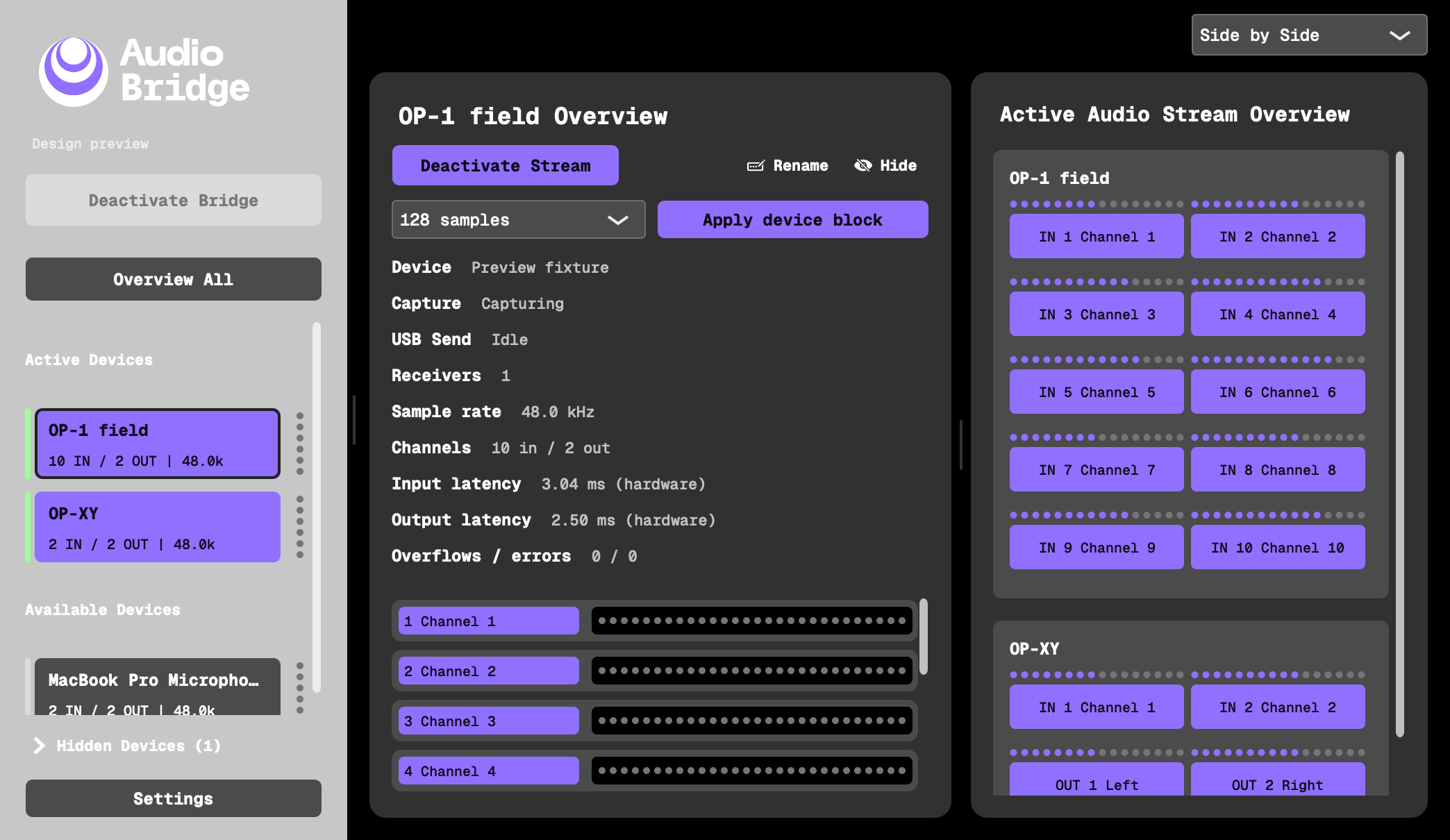
Active devices, available channels and audio levels in one desktop app. Switch views and customize the appearance while Receive and Send work inside your DAW.
Application screenshots with demonstration data.Not every DAW or system has been tested.
We would love to explore more setups
and hear what works for you.
Apple Silicon on macOS 15.7.9. Receive loading and routing were observed in Ableton Live 12.4.5; Receive loading and reception were observed in Logic Pro 11.2.2.
OP-1 field exposed 10 inputs and 2 outputs; OP-XY exposed 2 inputs and 2 outputs. Device detection and stream opening have been checked.
Other DAWs, OS versions, drivers and devices are not fully tested. Long sessions, complete multitrack recording and Send workflows on physical hardware still need validation.
The current build is Apple Silicon only. Intel Macs are untested and not included. Windows and Linux versions are planned, but not available yet.
Using another DAW or device? Tell us your OS, hardware, plugin format and what you tried. Success stories and bug reports both help.
Share your setup ↗Connect your hardware, record its channels
and send audio back. Keep your studio moving.
Launch offer: first 100 paid licenses at €15. Regular price €30 / $30.
Checking launch availability…
One desktop app and two plugins. The Audio Bridge app runs on your Mac and manages the device connections. Receive brings USB audio into your DAW. Send routes DAW audio back to a device. Both plugins come in VST3 and Audio Unit formats. Keep the app running while using the plugins.
Your DAW still uses its selected input and output device settings. Instead of replacing that interface, Audio Bridge opens separate connections to additional Core Audio devices. You select those devices inside Receive and Send, so their audio becomes available through plugins in the same session.
Yes. Connect several USB audio devices to the same Mac and activate a stream for each in the app. Load a Receive instance per device in your DAW; multiple Receive instances can also share the same device stream, each with its own channel routing and buffer settings. Each instance provides up to 30 channels. Send can run alongside Receive, with one active Send instance per device. To send several tracks to the same device, mix them into a DAW bus first.
Each plugin instance has its own buffer setting, so you can tune the balance between latency and stability for each route. Start at two buffer blocks and increase if you hear dropouts. Running more streams adds system load; the lowest stable latency depends on your devices, their drivers, hardware and DAW block sizes, and sample rates. The plugins display buffer, conversion and reported hardware delays to help you tune your setup. These are estimates, not a measured physical round trip.
No Aggregate Device is required. Your main interface stays on its existing audio path, while the Audio Bridge app manages the additional USB connections. That avoids Aggregate Device configuration; it is not a zero-latency promise. The bridge has its own buffers and sample-rate conversion, and latency depends on your devices and settings. We have not established a measured latency advantage over Aggregate Devices.
Yes, for hardware that supports USB audio. Receive captures its audio directly over USB, and Send routes audio back through USB. Those connections do not occupy analog sockets on your main interface, leaving them available for other instruments and microphones.
Yes, when OP-1 field exposes its 10-channel USB mode: one Receive instance provides the stereo master and four stereo tape tracks as five separate output pairs. Route those pairs to DAW audio tracks or auxiliaries. This is specific to OP-1 field and its USB mode; a complete recording of distinct musical tracks remains part of our test plan.
Yes. One Send instance routes a DAW track or external sidechain to one stereo USB output pair on the selected device. Choose USB as the recording or sampling source on your hardware where required. The Audio Bridge app must be running. Physical Send workflows are still being validated.
The device must expose audio to macOS, directly or through its driver. USB MIDI alone does not carry audio. Your DAW must support the appropriate VST3 or AU format and routing. We have not tested every DAW, system version or device; try your own setup and share your results.
Looking for “Overbridge for OP-1F”? Audio Bridge follows the idea of connecting hardware audio to a DAW through plugins, using devices recognized by Core Audio. It does not provide Elektron-specific synth editors, preset management or device integration. Audio Bridge is independent and is not affiliated with Elektron or teenage engineering.
The planned offer is a full 14-day trial, followed by a one-time license (€15 for the first 100 launch purchases in EUR; regular price €30 / $30) for the app and both plugins. Trial enforcement and in-app license activation will be connected before public release.
Both are planned, with no release date announced yet. Choose Windows or Linux in Stay in the loop to receive platform updates. The current development build runs on Apple Silicon Macs.

Search, build, save and track your music gear.
Explore the catalogue, build your wishlists and map your studio connections. EURA brings your gear and your setup together.
Explore EURA ↗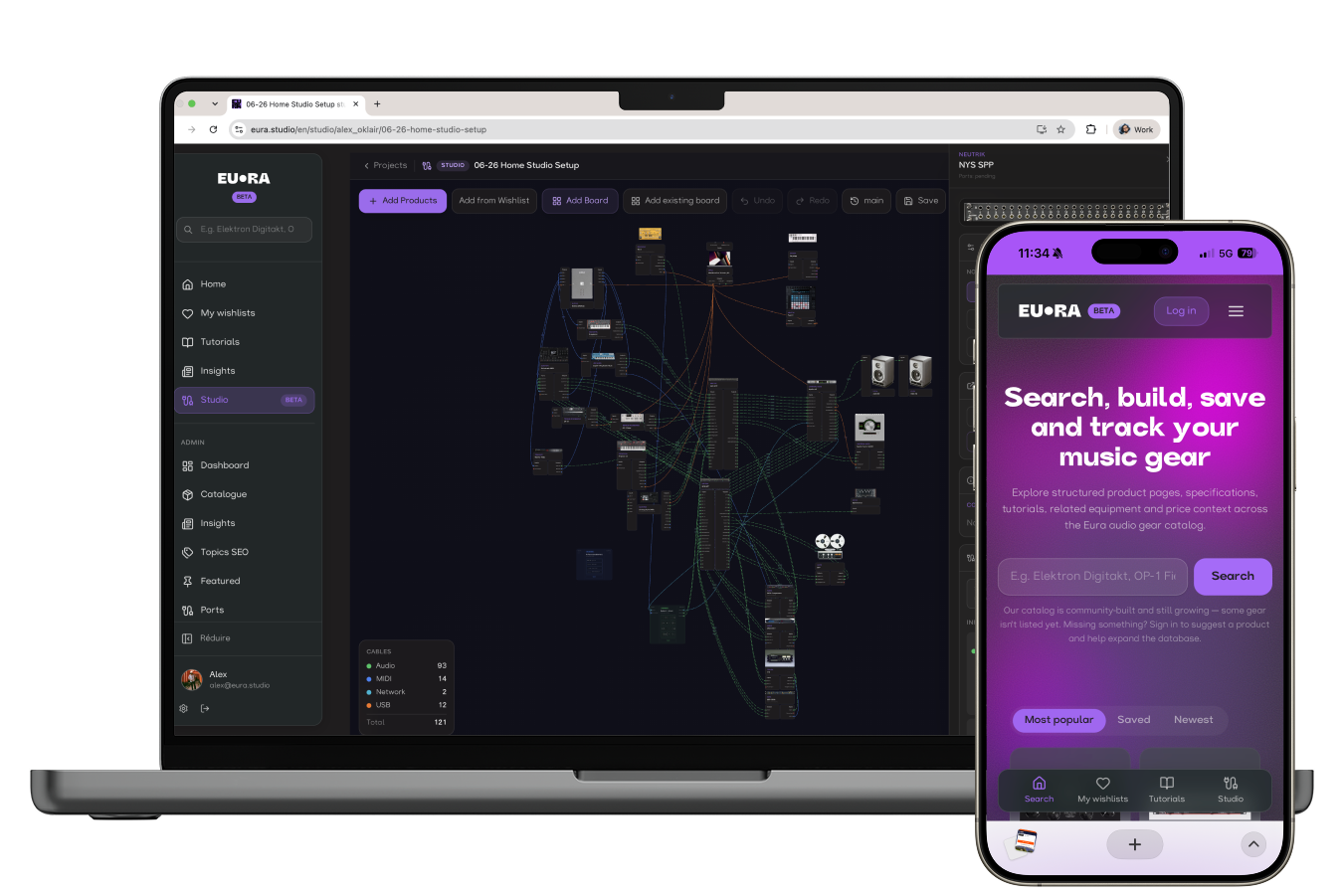
One app + Receive + Send · macOS · 14-day trial